
For MailboxGUI Free Edition
Includes 95 custom models, the standalone client resource-pack ZIP, matching Free gui.yml, and optional Free ItemsAdder integration. This does not add Premium network features.
Paid companion product · Both plugin editions included
One purchase includes a resource-pack bundle for MailboxGUI Free Edition and another for MailboxGUI Premium Edition.
Free Edition includes 95 custom models. Premium Edition includes 122 custom models: the same 95 shared models plus 27 Premium-exclusive models, including network GUI appearances.
The edition labels identify which plugin each bundle is for. Neither resource-pack bundle is a free download. This purchase does not include a MailboxGUI Premium plugin license.
3.99 USD · One purchase, both bundles
Version Compatibility: 6.1.0 Free · 6.1.0 Premium
Rendition: 1
Minecraft Compatibility: 1.18.2 - 1.21.11 / 26.1 - 26.3
Release Notes & Edition DownloadsUse only the edition matching your installed plugin: MailboxGUI Free must use the Free Edition pack and configuration. MailboxGUI Premium must use the Premium Edition pack and configuration. Mixing editions or installing both packs can break the GUI.
Includes 95 custom models, the standalone client resource-pack ZIP, matching Free gui.yml, and optional Free ItemsAdder integration. This does not add Premium network features.
Includes 122 custom models (95 shared plus 27 Premium models), the standalone client resource-pack ZIP, matching Premium gui.yml, and optional Premium ItemsAdder integration. Includes appearances for Premium network controls, delivery tools, diagnostics, and restricted-content placeholders. These appearances do not enable or bypass plugin features or permissions; the Premium plugin requires its separate license.
Both edition bundles, access to all published resource-pack versions, and support for future releases are included. Each release page has separate Download Free Edition Pack and Download Premium Edition Pack buttons; each downloads only that edition’s bundle.
Version Compatibility lists the supported MailboxGUI versions and editions, such as 6.1.0 Free and 6.1.0 Premium. Rendition is the separate pack revision number, such as 1. A rendition can support more than one plugin version. Select a compatible plugin edition, version, and Minecraft version rather than always installing the newest pack.
See the artwork before you buy
Explore the MailboxGUI Resource Pack icon collection: 95 custom models for Free Edition and 122 for Premium Edition.
This catalog shows the pack artwork at an enlarged scale. It is an icon reference, not an in-game GUI layout or a representation of floating notification size.
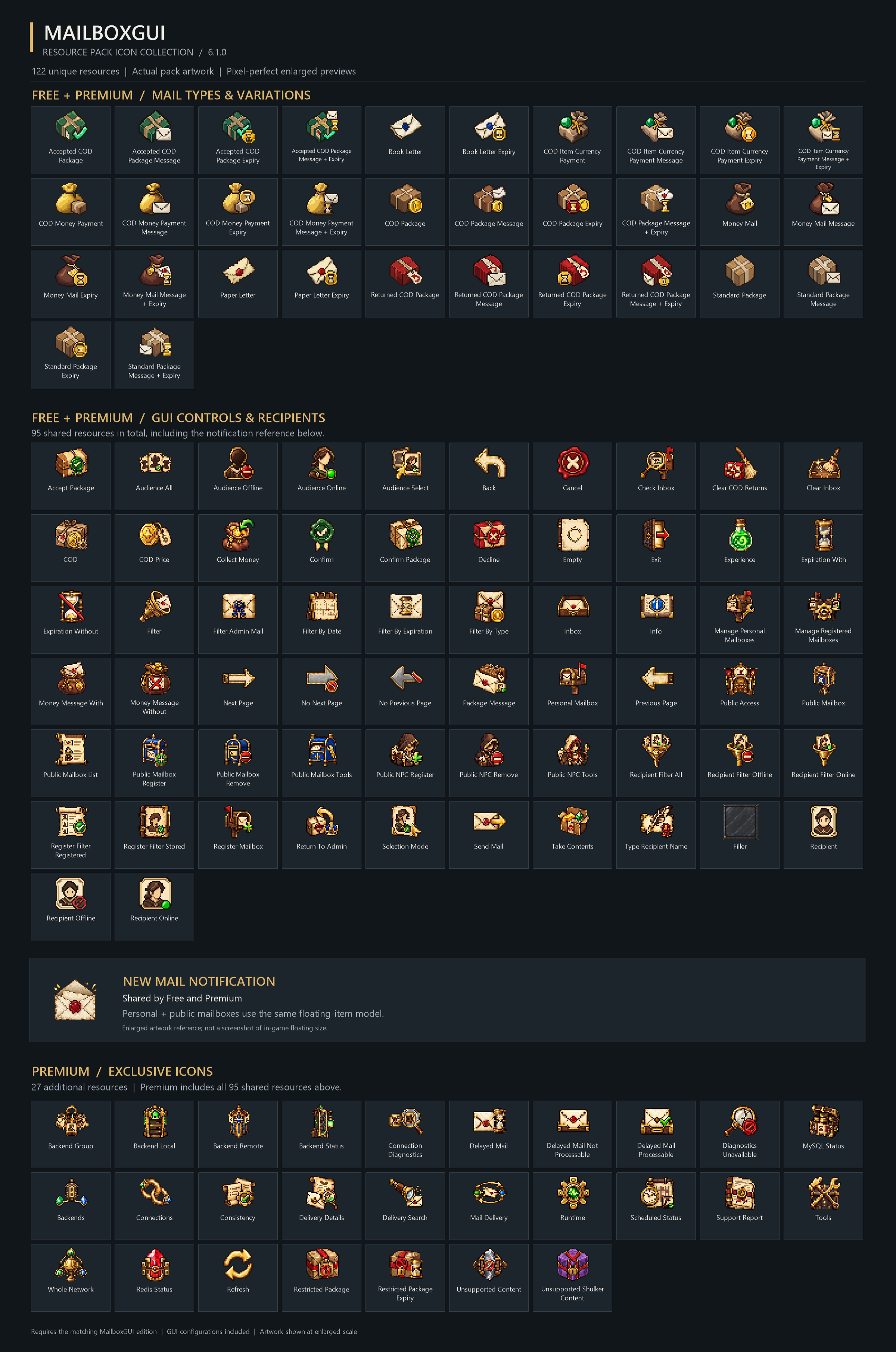
Match your edition: Free plugin → Free Edition pack; Premium plugin → Premium Edition pack. Mixing editions or installing both can break the GUI. A resource-pack purchase does not grant a MailboxGUI Premium plugin license.
The current bundles include the following files. Older releases may differ; check their release notes.
MailboxGUI-Free.zip
├── MailboxGUI-Free-ResourcePack-6.1.0-1.zip
├── ItemsAdder-Free-6.1.0-1.zip
├── gui.yml
├── INSTALLATION.md
├── ITEMSADDER.md
├── RESOURCE-PACK-API.md
├── mappings.json
├── MAPPINGS.md
├── VALIDATION.json
├── compatibility.json
└── resource-pack.sha1
The Premium download is MailboxGUI-Premium.zip, with MailboxGUI-Premium-ResourcePack-6.1.0-1.zip, ItemsAdder-Premium-6.1.0-1.zip, and its matching Premium configuration, mappings, and documentation. MAPPINGS.md and mappings.json describe exact GUI/model assignments; VALIDATION.json records build validation. Follow INSTALLATION.md, back up gui.yml and config.yml, and check compatibility.json. The outer customer ZIP is an installation bundle, not the Minecraft resource pack.
The default installation is client-managed: the administrator installs the matching gui.yml, enables gui-customization.enabled, and runs /mba reload. Players install and enable the inner edition-specific resource-pack ZIP through Minecraft’s Resource Packs screen, then run /mb settings resourcepack on and reopen their menus. Leave gui-customization.require-automatic-detection false for manually installed client packs.
/mb settings resourcepack off restores built-in icons. /mb settings resourcepack auto uses custom appearances only after a server-sent pack is confirmed loaded; it cannot detect a manually installed pack. Preferences are local to each player/backend, not shared network-wide. MailboxGUI does not send, require, or install a pack itself.
ItemsAdder is not required for the standalone pack. Each optional ItemsAdder ZIP contains raw edition-specific assets, the matching configuration and mappings, id-reservations.json, integration.json, source-pack.zip, and merge_itemsadder_pack.py (Python 3.9+). Read ITEMSADDER.md and work on staging first. Use only one edition.
Import the matching raw assets, build your ItemsAdder pack, then use the included helper to check collisions and merge the legacy and modern PAPER carrier definitions into a new combined ZIP. Repeat the checks after every rebuild or addon change. Publish only the verified combined ZIP with its new SHA-1; the standalone resource-pack.sha1 is not the combined pack’s hash. This is an optional asset-import and offline-merge workflow, not an automatic installer or live ItemsAdder certification.
The Premium pack includes the network GUI models and mappings needed by MailboxGUI Premium. For server/gateway-delivered packs, RESOURCE-PACK-API.md explains optional authenticated, session-bound backend status reporting when loaded acknowledgements do not reach Bukkit. Free supports reporting on a single backend; Premium networks must report separately on every relevant backend and again after transfers. The bundle includes a guide, not an installed proxy bridge, transport, or shared preference database.
When using server-pack detection, players can select auto. Administrators can set gui-customization.require-automatic-detection: true and reload to lock that mode; pack delivery and mandatory acceptance remain the responsibility of the actual delivery system. Test your merged pack and network independently.
After purchase, your resource-pack access appears on the MailboxGUI download page, Account Downloads, and Purchases & Licenses. One resource-pack entitlement unlocks both edition files on every published release page; it does not unlock Premium plugin builds or Premium-only Discord roles.