
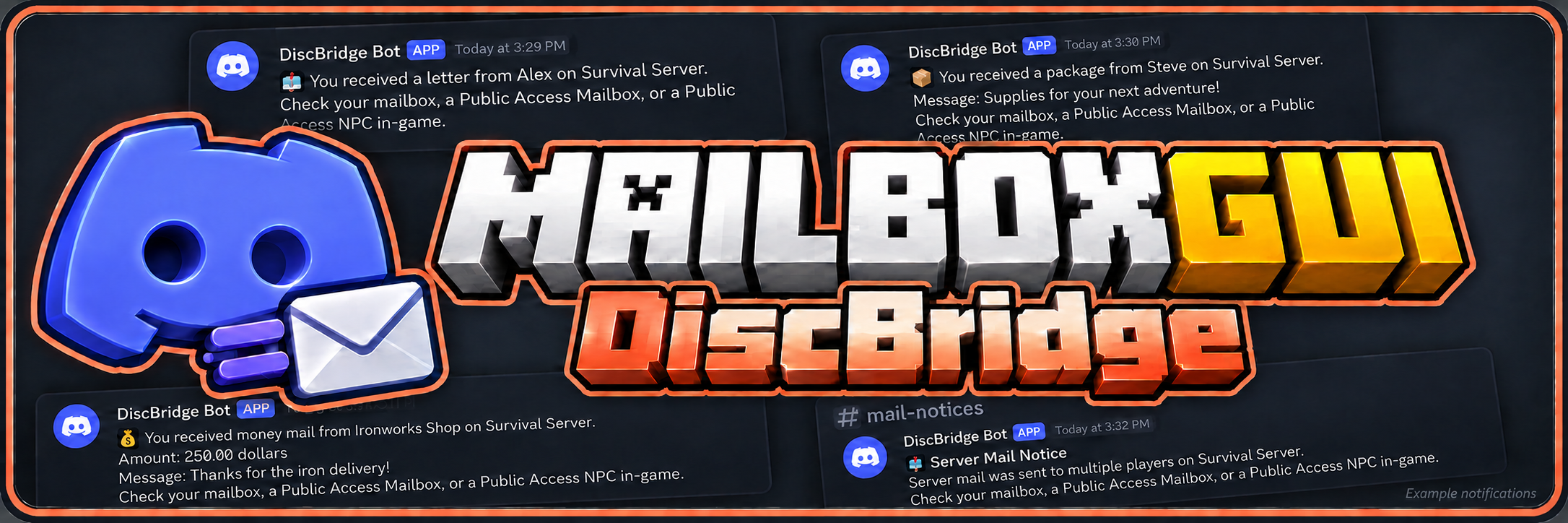
MailboxGUI-DiscBridge connects MailboxGUI mail delivery to Discord through DiscordSRV. It is available as DiscBridge Free for single-server Free setups and DiscBridge Premium for MailboxGUI Premium networks. Players can receive Discord notifications when new mail arrives, even while they are away from the server, and choose which notifications they want to receive.
DiscBridge Premium 2.1.0 adds network Discord notifications to MailboxGUI Premium 6.1.0.
If you do not need networking, use MailboxGUI Free + DiscBridge Free. MailboxGUI downloads · DiscBridge downloads
BungeeCord/Velocity-style networks: Install MailboxGUI Premium on every participating backend server, not on the proxy. Install DiscBridge Premium and DiscordSRV on one designated notification backend alongside MailboxGUI Premium. Other backends forward supported Discord commands and notification work through MailboxGUI Premium. DiscBridge Premium is not a proxy plugin.
Sections marked Free/Premium are shared features; sections marked Premium require both Premium editions.
Free and Premium Editions
Editions must match: MailboxGUI Free + DiscBridge Free, or MailboxGUI Premium + DiscBridge Premium. DiscBridge Premium requires a separate MailboxGUI Premium license; neither companion edition runs independently.
Feature Comparison
| Feature / Requirement | Free | Premium |
|---|---|---|
| Required MailboxGUI edition | DiscBridge 2.1.0 Free requires MailboxGUI 6.1.0 Free. | DiscBridge 2.1.0 Premium requires MailboxGUI 6.1.0 Premium. |
| Recommended setup | Single-server Discord mail notifications. | Discord mail notifications across a MailboxGUI Premium network. |
| Supported notification types | Paper/book letters, packages, money mail, COD, item-currency payments, and returned COD packages. | Same notification types, including eligible deliveries from participating backends. |
| Attached messages and expiration | Package and money-message attachments, expiration-aware templates, and configurable placeholders. | Same templates plus network routing and backend context. |
| Player controls | Enable/disable, online-DM preferences, selected language, sender ignores, and admin-mail filters. | Same controls with shared player preferences across the network. |
| Languages and command localization | 16 languages; integrated MailboxGUI command syntax, localized help, and tab completion. | Same language and command localization support. |
| Account linking | Uses DiscordSRV account links; Discord settings must allow delivery. | Uses the designated DiscordSRV host's account linking; no separate DiscBridge account link. |
| Mass-mail notifications | Admin/API channel notices and optional queued direct messages. | Same controls for eligible network mail events. |
| Retry and restart recovery | Persistent notification outbox with retries and recovery for accepted work. | Durable network dispatch and retry handling. Neither edition guarantees exactly-once Discord delivery. |
| Online status | Uses local server player presence. | Uses network-wide presence when applying online-DM preferences. |
| Settings and admin commands | Integrated /mb settings discord and /mba discord commands on the local server. | Integrated commands can be forwarded from other participating MailboxGUI Premium backends. |
| Backend-aware templates | No network backend or routing information. | Origin/notifier backend names, claim targets, backend groups, routing information, and conditional network template sections. |
| Network diagnostics | Local DiscBridge and DiscordSRV readiness status. | Adds /mba discord networkstatus and /mba discord networksupport for notifier readiness and sanitized reports. |
| Data and network services | Local YAML preference and pending-notification files; no network database or Redis setup. | Shared companion data through MailboxGUI Premium, local durable staging, and MailboxGUI's shared MySQL/MariaDB + Redis services. |
| BungeeCord / Velocity installation | DiscBridge Free, MailboxGUI Free, and DiscordSRV on the same single-server backend; never on the proxy. | MailboxGUI Premium on every participating backend; DiscBridge Premium + DiscordSRV on exactly one notification backend. Never install these JARs on the proxy. |
| Multiple notification hosts | Single-server companion installation. | Multiple active DiscBridge Premium hosts pause network dispatch until duplicate installations are resolved. |
| Edition pairing | Free + Free. | Premium + Premium; cross-edition pairing is unsupported. |
Version Support
| DiscBridge Release | Status | MailboxGUI Compatibility |
|---|---|---|
| 2.1.0 Free | Supported | MailboxGUI 6.1.0 Free; single-server setup. |
| 2.1.0 Premium | Supported | MailboxGUI 6.1.0 Premium; matching Premium editions. |
| 2.0.0 Free | Supported older release | MailboxGUI 6.0.0 Free; no networking. Use the versioned wiki for its different features. |
| 1.1.1 and older | Unsupported | Upgrade MailboxGUI first, then use the matching DiscBridge 2.1.0 edition before requesting bug support. |
Back up both plugin folders, player preferences, customized templates, pending notifications, and MailboxGUI’s database before upgrading. Versions 2.0.0 and 2.1.0 include upgrade systems.
| Platforms | Minecraft Version | Storage | Languages |
|---|---|---|---|
| Paper • Spigot • Purpur • Bukkit | 1.18.2–26.3 | Free: local YAML preferences and pending notifications. Premium: shared companion data through MailboxGUI Premium, with local durable staging. | English • German • Spanish • French • Italian • Japanese • Korean • Dutch • Polish • Brazilian Portuguese • Russian • Swedish • Ukrainian • Simplified Chinese (Mainland China) • Traditional Chinese (Hong Kong SAR) • Traditional Chinese (Taiwan) |
Installation by Edition
| DiscBridge Version | Required MailboxGUI Version | Installation |
|---|---|---|
| 2.1.0 Free | 6.1.0 Free | MailboxGUI Free, DiscBridge Free, and DiscordSRV on the same backend. No network database or Redis is required. |
| 2.1.0 Premium | 6.1.0 Premium | MailboxGUI Premium on each participating backend; DiscBridge Premium + DiscordSRV on one notification backend. Never install these JARs on the proxy. |
Features — v2.1.0
Discord Mail Notifications (Free/Premium)
- Direct messages for paper letters and book letters.
- Package and money mail notifications, including attached messages.
- Cash-on-Delivery package notifications.
- COD item-currency payment and returned COD package notifications.
- Expiration-aware messages for mail with an expiration date.
- Configurable Discord message templates and placeholders.
- Admin and API mass-mail channel notices.
- Optional queued direct messages for mass mail.
- Persistent notification outbox with retry and restart recovery for accepted work.
Player Notification Controls (Free/Premium)
- Enable or disable Discord mail notifications.
- Choose whether to receive direct messages while online.
- Ignore or unignore specific senders.
- Manage admin/server mail direct-message preferences.
- Choose a language for Discord notification messages.
- Check notification settings and Discord account link status.
- Access Discord settings and a setup guide directly through MailboxGUI.
Admin Tools (Free/Premium)
- View DiscBridge status.
- Reload configuration and message templates.
- Check for updates and stage an update for the next restart.
- Configure mass-mail channel notices and direct-message delivery.
- Enable or disable player access to Discord commands after checking setup readiness.
In-game messages follow MailboxGUI's language and client locale settings. Discord direct messages use the player's selected Discord language, falling back to MailboxGUI's default language. Channel notices use MailboxGUI's default language.
DiscBridge commands are integrated into MailboxGUI and inherit its command-syntax locale. Set locale.command-syntax.default in MailboxGUI's config.yml before startup to register localized command roots alongside English. Help and tab completion support localized syntax. Changing registered command roots requires a server restart.
Network-Wide Notifications (Premium)
- Receive Discord notifications for eligible mail delivered on participating MailboxGUI Premium backends.
- Use one designated DiscordSRV backend to handle network notification delivery.
- Respect the player's network-wide online status when applying online direct-message preferences.
- Access integrated Discord player and admin commands from other participating MailboxGUI Premium backends.
- Accepted notification work uses durable storage, retries, and restart recovery. Discord delivery is not guaranteed to occur exactly once.
Shared Player Preferences (Premium)
- Share notification enablement, online-DM choices, preferred Discord language, and sender/admin filters across the network.
- Apply preference changes made through commands on participating backends.
- Recheck notification preferences and account links before sending and retrying notifications.
- Preserve supported existing preferences and customized templates when upgrading from Free.
Backend-Aware Discord Templates (Premium)
- Include the mail's origin backend and the designated notifier backend in Discord messages.
- Show backend claim targets, backend groups, and routing or restriction information when available.
- Use network placeholders such as {origin_backend_name}, {target_backends}, {backend_group}, and {routing_status}.
- Use conditional template sections to hide absent network information.
- Help players identify where mail can be claimed while retaining MailboxGUI's backend and item restrictions.
Network Status and Support Tools (Premium)
- Check network readiness, notifier state, and shared preference/dispatch availability.
- Generate a local support report that excludes credentials, tokens, player UUIDs, and private mail content.
- Use dedicated permissions for network status and support exports.
Commands and Permissions
Player Commands (Free/Premium)
All player commands require mailboxgui.player.use and mailboxgui.player.discord. Enable player-commands.enabled in DiscBridge's config.yml, or use /mba discord playercommands on after setup checks pass. The integrated permission supplies mailboxguidiscbridge.use; the additional preference permissions below are enabled by default.
| Command | Additional Permission | Requirement / Action |
|---|---|---|
/mb settings discord | No additional permission | Show Discord notification help. |
/mb settings discord guide | No additional permission | Open the account-linking and notification setup guide. |
/mb settings discord status | No additional permission | Check notification settings and account link status. |
/mb settings discord enable / /mb settings discord disable | No additional permission | Enable or disable Discord mail notifications. |
/mb settings discord online <on/off> | mailboxguidiscbridge.online | Control direct messages while online. |
/mb settings discord language <language> | No additional permission | Choose the language used for Discord notifications. |
/mb settings discord ignore <player> / /mb settings discord unignore <player> | mailboxguidiscbridge.ignore | Ignore or allow a player's notifications. |
/mb settings discord ignorelist | mailboxguidiscbridge.ignore | View ignored senders. |
/mb settings discord ignoreadmin / /mb settings discord unignoreadmin | mailboxguidiscbridge.ignoreadmin | Control individual admin/server mail direct messages. |
Admin Commands (Free/Premium)
mailboxgui.admin.discord grants integrated access to DiscBridge administration. As an alternative, use mailboxguidiscbridge.admin together with the action-specific permission shown below. Players also need mailboxgui.player.use for the MailboxGUI command root.
| Command | DiscBridge Action Permission | Requirement / Action |
|---|---|---|
/mba discord | mailboxguidiscbridge.admin | Show DiscBridge admin help. |
/mba discord status | mailboxguidiscbridge.admin.status | View plugin and DiscordSRV readiness status. |
/mba discord reload | mailboxguidiscbridge.admin.reload | Reload configuration and message templates. |
/mba discord playercommands <on/off> | mailboxguidiscbridge.admin.playercommands | Enable or disable player controls; enabling requires setup readiness checks to pass. |
/mba discord updatecheck | mailboxguidiscbridge.admin.update | Check for updates; requires internet access. |
/mba discord update | mailboxguidiscbridge.admin.update | Begin the update workflow; restart to load a staged update. |
Network Admin Commands (Premium)
| Command | Permission | Action |
|---|---|---|
/mba discord networkstatus | mailboxguidiscbridge.admin.networkstatus | Check network and notifier readiness. |
/mba discord networksupport | mailboxguidiscbridge.admin.networksupport | Generate a local sanitized network support report. |
These examples use English syntax, which is always available. Permissions control command access; linked accounts, notification preferences, bot connectivity, and Discord delivery settings still apply to actual notifications.
Reload behavior (Premium): /mba reload refreshes DiscBridge’s inherited network settings only; it does not reload DiscBridge configuration or language files. Use /mba discord reload for DiscBridge configuration and message templates.
For the full command and permission list, use the official wiki.
Installation
BungeeCord/Velocity-style networks: Install MailboxGUI Premium on every participating backend server, not on the proxy. Install DiscBridge Premium and DiscordSRV on one designated notification backend alongside MailboxGUI Premium. Other backends forward supported Discord commands and notification work through MailboxGUI Premium. DiscBridge Premium is not a proxy plugin.
Single-Server Setup (Free)
- Install MailboxGUI 6.1.0 Free and DiscordSRV on your supported backend server.
- Add DiscBridge 2.1.0 Free to that same server’s
pluginsfolder. - Start once to generate files, then stop and review
plugins/MailboxGUI-DiscBridge/config.yml. - Configure DiscordSRV’s bot and account linking, then start the server.
- Check
/mba discord statusand enable player controls with/mba discord playercommands onafter readiness checks pass. - Players use
/mb settings discord guidefor account linking and notification setup.
Free does not provide network notification forwarding or shared network preferences. Install all three Free-setup plugins on the same backend, never on the proxy.
Network Setup (Premium)
- Install matching MailboxGUI Premium versions on the participating backend servers and configure its shared MySQL/MariaDB and Redis network services.
- Choose exactly one notification backend and install DiscordSRV and DiscBridge Premium there, alongside MailboxGUI Premium. Other backends access the companion through MailboxGUI Premium; they do not need another DiscBridge installation.
- Start the notification backend to generate files, then stop it and review plugins/MailboxGUI-DiscBridge/config.yml.
- Configure DiscordSRV, then start the notification backend and participating servers.
- Check /mba discord status and /mba discord networkstatus.
- Enable player controls with /mba discord playercommands on after setup checks pass.
- Players can use /mb settings discord guide for DiscordSRV account linking and notification setup.
DiscBridge Premium inherits the notification backend's MailboxGUI network identity and configuration automatically. It does not need a separate network toggle or its own MySQL/Redis connection settings. When MailboxGUI networking is disabled, Premium can operate locally during setup.
Important: Install the companion on only one notification backend. Multiple active DiscBridge Premium hosts pause network dispatch until the duplicate installation is resolved.
For upgrades, back up the DiscBridge and MailboxGUI folders, MailboxGUI's database, and relevant shared companion data. Keep existing player preferences, customized templates, and pending-notification files.
Java: Use the Java runtime required by your server; plugin bytecode requires Java 17 or newer. Folia support is not included.
Dependencies
| Dependency | Requirement | Link / Availability |
|---|---|---|
| MailboxGUI Free 6.1.0 | Required for DiscBridge Free on the same single-server backend. | MailboxGUI downloads. |
| MailboxGUI Premium 6.1.0 | Required on every participating backend; Free is incompatible. | MailboxGUI downloads. |
| DiscordSRV | Required for either edition. Free: same single-server backend. Premium: the one notification backend. | DiscordSRV on SpigotMC |
| MySQL or MariaDB | Premium networking only: shared database configured through MailboxGUI Premium. | MySQL • MariaDB |
| Redis | Premium networking only: coordination configured through MailboxGUI Premium. | Redis |
Editions must match: Free + Free or Premium + Premium. Players link their Minecraft and Discord accounts through DiscordSRV; bot connectivity and Discord direct-message settings still apply.
Support
- Support: Plugin support and Discord guide
- Wiki: DiscBridge documentation
如果您需要中文帮助,咨询插件使用、配置及问题反馈,欢迎加入 ImagineCraft 插件 QQ 交流群。
QQ群号:101849876 · 群内联系人:AFK·落子无悔(飞机)
Contributors
- nice — Simplified Chinese (Mainland China) and Traditional Chinese (Hong Kong SAR) translations.
- De4d__ — Brazilian Portuguese translation.
Want to contribute? Visit the Support guide and post in Plugin Discussion. Rismr1 will respond to you. Translation contributions, bug reports, and feature suggestions are welcome!